Modern checkout for busy supermarkets in Nigeria.
With JUMPQ, shoppers can scan items as they shop and complete checkout faster. Your team verifies each order with a simple code and keeps queues moving.
Works for single stores and multi-branch supermarket operations.
How JUMPQ works in-store
A straightforward flow your team can start using quickly.
- 1
Shop as usual
- Customers pick their items around the store just like they normally do.
- 2
Build cart on phone
- Items are scanned into a digital cart, reducing work at the counter.
- 3
Checkout and get code
- After checkout, the system generates a secure code linked to that cart.
- 4
Cashier verifies quickly
- Cashier confirms items in the cashier app and clears the customer in seconds.
Cashier app
Built with cashiers in mind, not just customers.
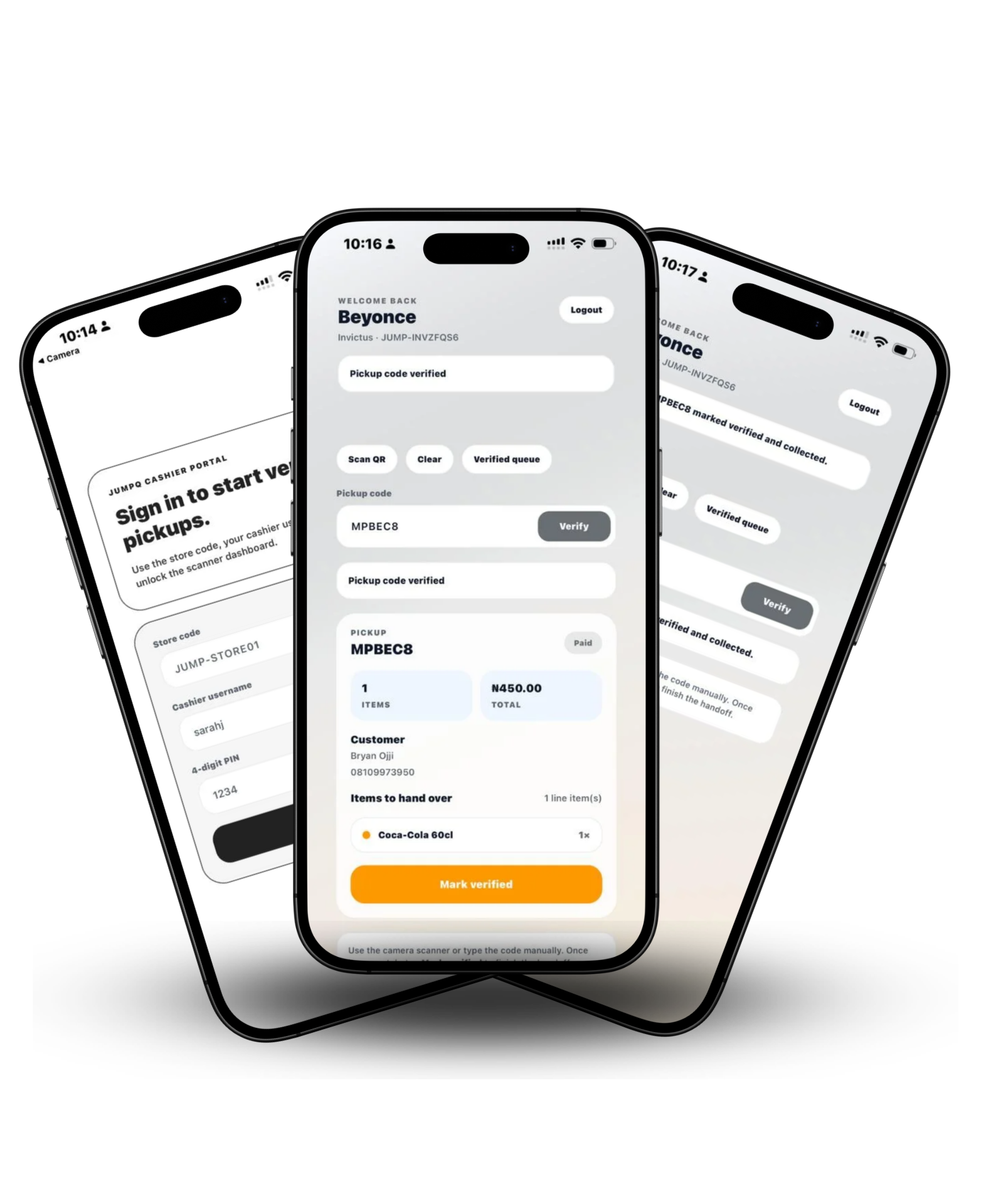
JUMPQ also includes a cashier app for fast in-store verification. When a shopper presents a code, your cashier confirms the cart quickly and clears checkout without manual back-and-forth.
- • Quick code validation at the counter
- • Clear item and payment status for staff
- • Better flow during peak periods
Why teams choose JUMPQ
Practical benefits for your customers, cashiers, and operations team.
Shorter checkout queues
More customers are processed per hour, especially during rush periods.
Cleaner verification flow
Cashiers verify one code instead of manually reconciling every item.
Better customer experience
Shoppers spend less time waiting and more time completing purchases.
Flexible payment options
Support online payment and pay-at-counter based on store policy.
Easier team coordination
Store staff, supervisors, and cashiers work from the same flow.
Multi-branch ready
Start with one branch and expand with consistent standards.
Operations layer
Not just another payment button.
JUMPQ connects customer scanning, checkout confirmation, and cashier verification in one flow. You keep control, your team works faster, and customers spend less time in line.

Common questions
Need a direct answer? Reach out at support@jumpqapp.com
- Getting Started
- Can a non-technical team use JUMPQ?
- Yes. Your operations team can manage day-to-day settings without needing developers.
- Can we start with one branch first?
- Absolutely. Many supermarkets start with one branch, train staff, and then expand gradually.
- Checkout Flow
- How does the code verification work?
- Each completed cart gets a unique code. Cashiers verify the code in the app and confirm release quickly.
- What does a cashier see on their app?
- The app shows cart details and payment status so staff can verify confidently at the counter.
- Payments
- Can customers pay online and at the counter?
- Yes. You can support both options and apply the mode that fits each branch.
- What happens after online payment?
- The cashier still verifies the code and cart, then clears the customer to exit quickly.
- Support
- Do you support onboarding and training?
- Yes. We help your team with setup, cashier workflow, and rollout planning.
- Where can I get support?
- Send us an email at support@jumpqapp.com or use the contact section below.
Ready to modernize your checkout flow?
We’ll help you launch a smoother customer and cashier experience, branch by branch.